A channel plays the wrong language
Check which Audio link that player is using, since the language code is at the end of it. Then check that its lead goes into the transmitter you labelled.
Setup guide
Wireless headphone receivers carry one language per channel. To offer several, each language needs its own player, its own transmission path and a label the audience can follow. This guide covers how many languages to put through receivers, how to match channels to languages, what to test, and what each extra language costs.
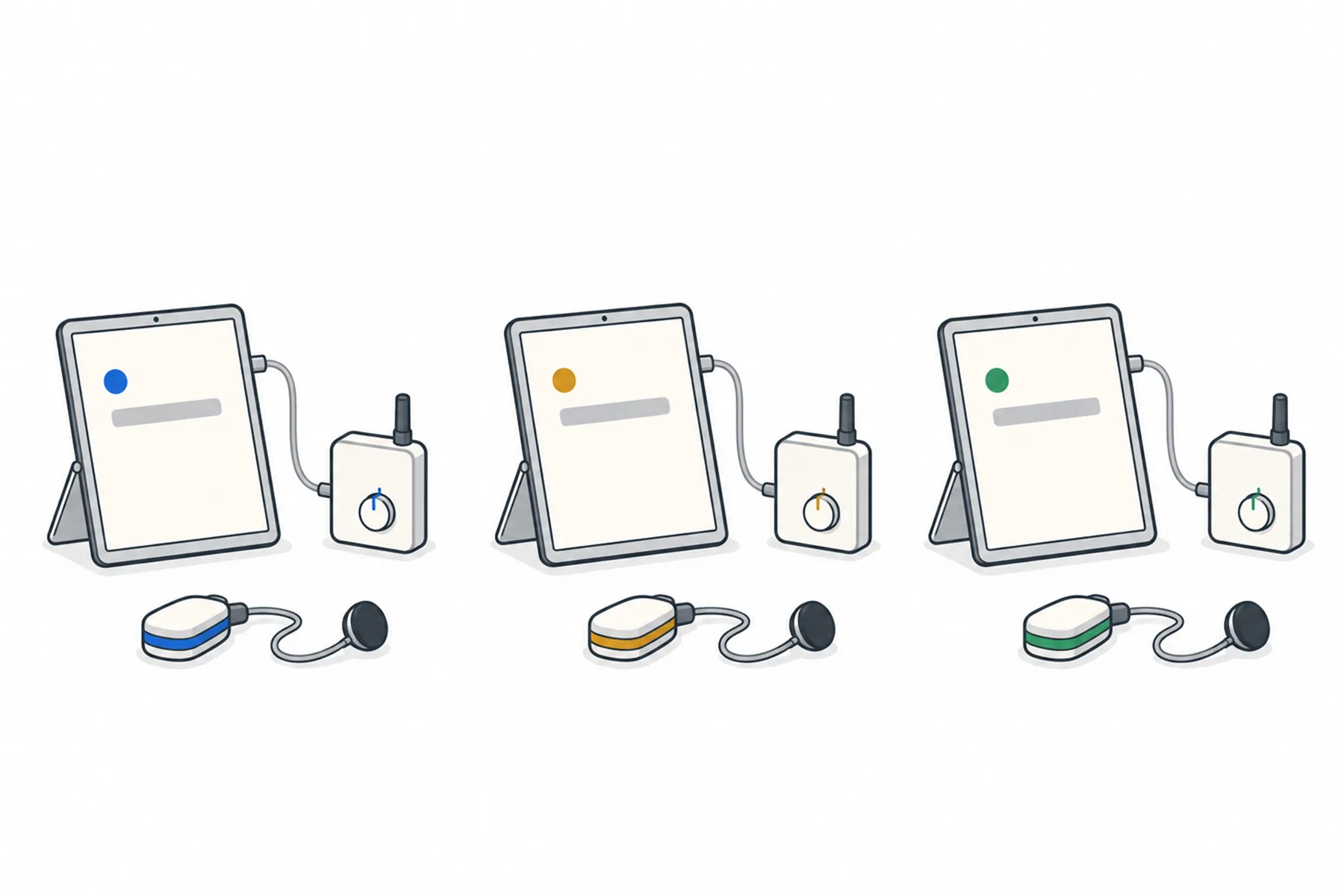
A receiver hears whichever channel it is tuned to. Each language you send needs a player device feeding its own channel. Everyone else uses their own phone, in any language the venue offers.
Most of the work is planning on paper before the day.
List the languages your audience needs, then ask which of them really need a receiver. People who are happy to read, or who would rather use their own phone, do not need one. A receiver is for the people who want to listen and are used to collecting one at the door.
Each language you send through the receivers needs its own player device and its own transmission path, so every extra language adds equipment. Keep the receiver languages to the ones that matter most, and let phones carry the rest. Phones can offer any language the venue offers, with nothing extra for you to carry.
A transmitter with a channel selector usually sends one programme at a time, on the channel you choose. Choosing channel 2 does not add a second input. Look in the manual for how many independent programmes it transmits at the same time. Several input sockets do not necessarily mean several programmes sent at once.
Check too that the receivers support the transmitter system and every channel you plan to use. Use the manufacturer’s recommended channel combinations, and test all the transmitters together.
That gives you the options: a system with several independent inputs, or one transmitter for each language, each on its own channel. If yours sends one programme only, a second language through receivers needs a second transmitter, or you offer that language on phones instead.
Each language gets its own device: a phone, tablet or computer that can open a web link and play sound. Give each its own Audio link, spanvoice.com/a/<venue code>/<language code>, from the venue’s Overview page under For your team or from Links & QR in the desk app. A media player such as VLC may keep playing with the screen off. Test your exact device and settings, including locking the screen and restarting the session, before relying on it.
Every language the venue offers can also be spoken. Spoken translation must be switched on for the venue, under Settings then Spoken translation. Leave Already on when someone arrives off, so people reading on their phones are not charged for a voice they did not ask for.
The headphone system guide shows how to connect each player to a transmitter, including the right lead for each kind of input and how to set the level.
Write a short channel sheet before the day: language, player device, transmitter, channel number. Put the same information where the audience can see it. A label at the door, a coloured tag on each receiver, or a sign beside the box of receivers all work.
Do not rely on colour alone: label each receiver or channel with the language name as well as its colour or channel number. Label the player devices and the leads too, and keep the devices apart on the table. Check for crossed leads, where two players are plugged into the wrong transmitters.
Start a short session from the desk and speak a sentence. Put on a receiver, then step through each channel in turn. On each one, check that you hear the language the label says, that the translation arrives with a delay that is acceptable for your event, and that nothing from another language is mixed in. Do it from the back of the room too, because coverage belongs to the transmitter.
Then stop the session. Whether a player picks up by itself when the real event starts depends on the device and the player, so check it on yours. If it does not, press play when the event goes live.
A rehearsal with every player running, as it will be on the day, also shows you what the setup will cost. See the ten-minute rehearsal.
People who want a language you are not sending, or who would rather read, use their own phones at the same time. They hear and read the same translation from the same session. Put the QR code beside the receivers so that nobody feels left out; the QR signs guide covers where to put it.
What each extra language through receivers needs. Phones need none of it.
| Languages through receivers | Player devices | Transmission paths |
|---|---|---|
| One | One | One input on one transmitter |
| Two | Two, one per language | Two inputs on a system that sends both at once, or two transmitters on different channels |
| Three or more | One per language | One path per language; check the manual for how many it sends at once |
| Available languages, on audience phones | No venue-supplied players | None, since each phone picks its own language |
Most channel problems are a lead or a label, not a fault.
Check which Audio link that player is using, since the language code is at the end of it. Then check that its lead goes into the transmitter you labelled.
Check spoken translation is switched on for the venue, the player is playing, and the event is live. The Nothing is being heard page goes through it.
The player sends silence between sentences. If the transmitter has an audio-triggered standby setting, check its manual and test whether it causes the gaps. If the gaps continue, check the player and the audio connection.
A device that locks its screen or takes a call can stop playing. Plug it in, set the screen to stay on, and turn on do-not-disturb. A media player keeps going with the screen off.
The first device to open a language may hear nothing until the next sentence. Start every player before the event begins.
Spoken translation is charged per minute for each language being listened to, not per receiver, and a playing player counts as a listener. Three channels running for an hour are charged as three languages. Stop unused players, and stop the session when you finish, because stopping the event stops the charge. This is separate from the caption charge, which runs by the hour for each language.
Still unsure
Tell us the transmitter and how many languages you want, and we will tell you what each one needs.
Talk to usThe free credit lets you try every channel with your own setup. No credit card needed.
A$10 of free credit when you sign up, no credit card needed. Credit never expires — use it this week or next year.