Live translation and captions — run from Australia, Europe and the United States
SpanVoice Try it free

Churches

Translation your volunteer can start on a Sunday morning.

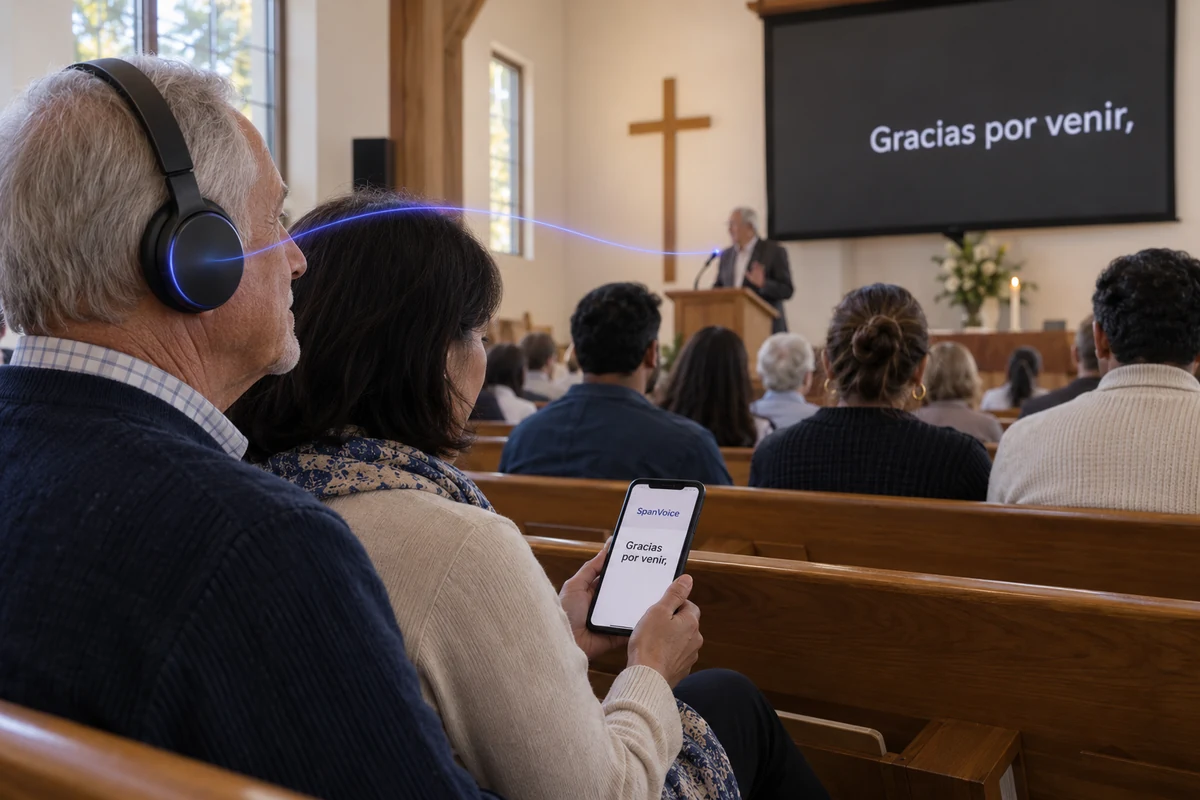
A service is run by whoever turned up early, not by a technician. One person starts the translation before the first song, the congregation reads along in the language each family speaks, and the headphone system you already own can carry the spoken voice. The same routine every week, whoever is on the roster.

A congregation follows projected captions, with one listener wearing headphones and another reading a phone.

Started by a volunteer, before the first song

Church translation has to survive the roster. The person on the desk this week may have done it twice before, and the service starts whether or not they remember every step. So the start is short: open the desk app or the browser page, pick the microphone feed, press start. The listening link on the screen is the same one as last week, and the QR code in the bulletin still works.

From then on the volunteer runs the mixer as usual. There is no second screen to watch and nothing to type during the sermon. If a guest preacher speaks another language, the volunteer taps that language in the app, or sets it to any language beforehand. When the service ends, they press stop, and that is the whole shift.
Where it earns its place in a church

The services and gatherings a congregation runs in a year, and what the translation does at each.

  • Sunday service translation for a bilingual congregation

    The sermon in the pastor’s language, read on phones in the language each family speaks, with the room screen carrying the one most of the hall needs.

  • A guest preacher who speaks another language

    Switch the spoken language for the sermon and the congregation reads it in theirs; switch back for the notices. Nobody arranges an interpreter.

  • A second-generation congregation

    Parents listen in the language of the church; their children read the same sermon in English on a phone, in the same pew, without a youth room.

  • Conference weekends and visiting speakers

    Three days, two languages, the same volunteer at the desk. Run it as the service is run, for as many sessions as the weekend has.

  • Weddings, funerals and dedications

    The extended family that comes once a year follows the whole service in the language they brought, from a card at the door.

  • Bible studies and midweek meetings

    A phone in a browser on the table is enough for a small room. The glossary keeps the names of books and people spelt the way your church spells them.

How it is done, every week

Three things, in order.

The person on the desk sees it once.
Nothing else changes about the service.

  1. 01 /

    Start it before the first song

    Open the desk app or the browser page on the computer that runs the screen, pick the microphone feed, press start.

  2. 02 /

    Put the link where the congregation looks

    On the screen before the service, in the bulletin, on a card at the door. It is the same link every week.

  3. 03 /

    Stop it after the benediction

    Press stop. The hours the service ran, in the languages people chose, are what the church pays for.

What a service needs

A church is not a conference. The room is fixed, the people come back every week, and the budget is a line in the offering.

  • The feed you already send to the speakers

    A spare output from the mixer, or the same laptop that runs the lyrics. A pulpit microphone that is already mixed is the cleanest source there is.

    Minimum
    A laptop or tablet in a browser, near the desk
    Better
    The desk app on the Windows computer that runs the screen
  • The link where the congregation can see it

    On the screen before the service, in the bulletin, on a card at the door. Families who come every week will have it saved after the first Sunday.

  • Your headphone system, if you have one

    A spare phone or tablet opens the listening link in the translated language, and a cable from its headphone socket goes into the transmitter you already use. The people wearing your receivers hear it as before.

  • Names and terms, entered once

    The pastor’s name, the name of the church, the words your congregation uses for its own things. Entered once in the venue’s glossary and used every week after.

The weekly routine, as the roster sees it

Before the service: computer on, app open, start. Check the screen shows the link and the first line of captions appears when someone tests the microphone. During the service: nothing. After: stop. The person next on the roster watches once and can do it the following week.

Lyrics belong on the lyrics screen you already run. Stop the captions when the singing starts and start them again when the speaker does; the gap is not charged. Announcements, prayers, the sermon and the notices are all captioned as they are spoken, in the language each person chose.

Why SpanVoice

What churches are usually offered. And what this is.

  • Paying for it

    Most translation services

    Usually a monthly or annual plan, charged whether or not a service ran that month.

    SpanVoice

    The hours each service runs, per language. A quiet month costs nothing.

  • Hours you did not use

    Most translation services

    Often a monthly allowance that resets; annual hour banks that lapse at twelve months.

    SpanVoice

    Credit never expires. What the church paid for stays until it is used.

  • A second language

    Most translation services

    Often one language included and a monthly charge for each one added.

    SpanVoice

    Any of the sixty, charged only while somebody in the pew is reading it.

  • The size of the congregation

    Most translation services

    Often tiers by audience size, or a cap on listeners per plan.

    SpanVoice

    Fifty or five hundred, the same price. Nothing per person.

  • The preacher’s language

    Most translation services

    Sometimes English in, other languages out.

    SpanVoice

    Preach in any of the sixty. Switch for a guest speaker and switch back.

  • Getting started

    Most translation services

    Often an onboarding call, a setup fee, or a device to buy for the sound desk.

    SpanVoice

    Sign up, start a session, read the first line on a phone. Nothing to buy.

  • The app at the desk

    Most translation services

    Usually a browser page, sometimes an app built for a different kind of room.

    SpanVoice

    A Windows desk app and a browser page, built and used weekly by people who run a church sound desk.

  • Where it runs

    Most translation services

    Rarely stated.

    SpanVoice

    Servers in Australia, Europe and the United States, so the captions keep pace in your part of the world.

  • Price

    Most translation services

    Compare it yourself: price your Sunday with any service you like.

    SpanVoice

    If you find a similar service for less, tell us and we will look into it.

What a weekly service costs

Worked out the way a treasurer would. Captions are A$1.05 per hour, per language, at today’s rate in AUD. A language is only charged while somebody is listening in it.

  • A Sunday morning service

    One language for the families who need it. 1.5 hours, 1 language — A$1.58.

  • A service with two languages running

    Two communities in one congregation. 1.5 hours, 2 languages — A$3.15.

  • A month of Sundays, one language

    Four services of ninety minutes each. 6 hours, 1 language — A$6.30.

  • A conference weekend

    Friday night to Sunday afternoon, two languages. 10 hours, 2 languages — A$21.00.

Before Sunday

Questions from the church office

Run a service with a headphone system or a particular desk? Tell us what you have.

Talk to us

Does the person on the sound desk need training?

They need to see it done once. Open the app, pick the microphone feed, press start; at the end, press stop. The listening link on the screen does not change from week to week, so the congregation does not have to learn anything new either.

Can we keep using the headphones we hand out?

Yes. A spare phone or tablet opens the listening link in the translated language and a cable from its headphone socket feeds your transmitter, so the people wearing your receivers hear it as they always have. Everyone else reads or listens on a phone.

What about the songs?

Leave them to the lyrics screen you already run. Stop the captions for the singing and start them again for the speaker; the gap is not charged. Announcements, prayers and the sermon are all captioned as they are spoken.

We only meet once a week. Is there a monthly fee?

No. You pay for the hours the service runs, in the languages people chose, and nothing in between. Credit never expires, so a quiet month costs nothing.

Try it this Sunday.

Start it before the first song, put the link on the screen, and let the congregation read along.

A$10 of free credit when you sign up, no credit card needed. Credit never expires — use it this week or next year.